 View on GitHub
 AirServiceKit Reference
AirServiceKit
AirServiceKit SDK allows you to include the AirService ordering platform right within your own iOS application.
AirServiceKitViewController can be used directly, or subclassed, and is simple to integrate anywhere you would typically use a UIViewController.
Usage
Simply import the AirServiceKit umbrella header to get started.
#import <AirServiceKit/AirServiceKit.h>
From there you just initialise an instance of the AirServiceKitViewController using your AirService credentials and you can start taking orders right away.
self.viewController = [[AirServiceKitViewController alloc] initWithClientID:@"22c7d3fc" clientSecret:@"aada245b93feb5d8e84dfeb49296da8b" collection:@"airservice-qa-sdk" delegate:self];
Full AirServiceKit documentation can be found at http://airservice.github.io/Open-API-and-SDKs/iOS/Docs/
Examples
The Examples directory demonstrates many common scenarios for integrating AirServiceKit. These demo Xcode projects include basic manual setups, cocoapods integration, modal presentation and supporting PayPal payments.
Project setup
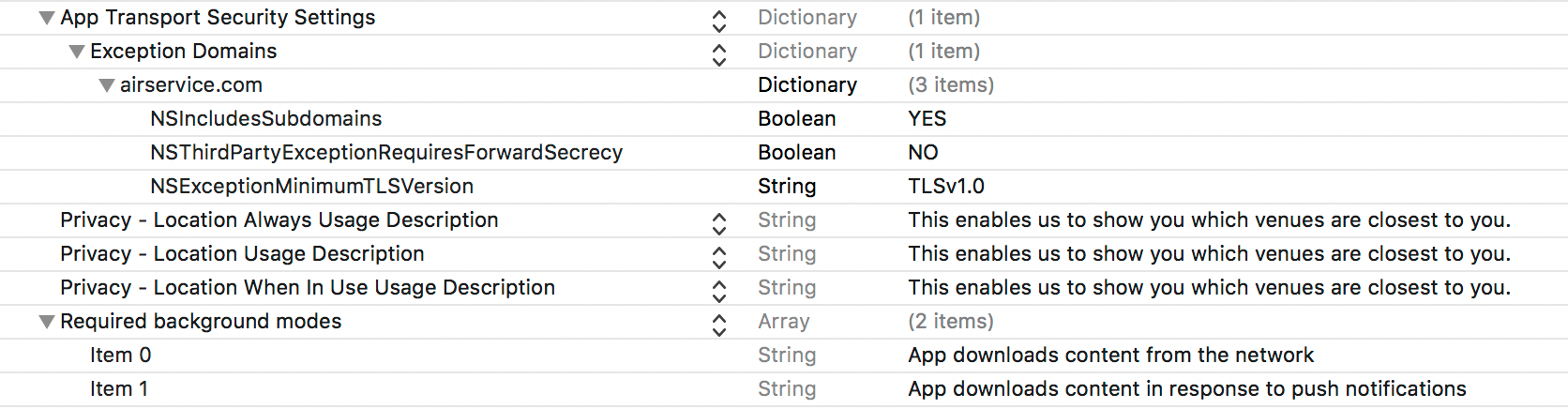
AirServiceKit requires that your apply the following settings in your project’s Info.plist:
- Required background modes
    - App downloads content from the network (fetch)
    - App downloads content in response to push notifications (remote-notification)

- App Transport Security Settings
    - Exception Domains
        - airservice.com
            - NSIncludesSubdomains = YES
            - NSThirdPartyExceptionRequiresForwardSecrecy = NO
            - NSExceptionMinimumTLSVersion = TLSv1.0

- Privacy - Location Usage Description =
- NSLocationAlwaysUsageDescription =
- NSLocationWhenInUseUsageDescription =
To provide a seamless password reset flow AirService uses a URL scheme to automatically return a customer to the app. Please provide AirService with a URL scheme that will open your application straight into AirService Ordering, ie. appname.airservice://login.
- URL types
    - Item 0
        - URL Schemes
            - Item 0 appname.airservice://login
For more information see the documentation
PayPal Payments
Supporting PayPal payments inside AirServiceKit also requires the ASPayPalPayments library.
You must supply an instance of ASPayPalPayments to AirServiceKit
self.viewController.acceptPayPalPayments = YES;
self.viewController.payPalPaymentsClient = [[ASPayPalPayments alloc] init];
ASPayPalPayments requires the following settings in your project’s Info.plist:
- LSApplicationQueriesSchemes
    - com.paypal.ppclient.touch.v1
    - com.paypal.ppclient.touch.v2
    - org-appextension-feature-password-management

- URL types
    - Item 0
        - URL Schemes
            - Item 0 $(PRODUCT_BUNDLE_IDENTIFIER).payments

Installation
Cocoapods
AirService recommends using CocoaPods. To install, simply add the following line to your Podfile:
pod 'AirServiceKit', :git => 'https://github.com/airservice/Open-API-and-SDKs.git'
To also support PayPal payments inside AirServiceKit you must also add the following line to your Podfile:
pod 'ASPayPalPayments', :git => 'https://github.com/airservice/Open-API-and-SDKs.git'
Run pod install from the command line and open the .xcworkspace file generated by CocoaPods.
Manual
- To manually install AirServiceKit in your Xcode project, download the latest release of
AirServiceKit.framework. - Go to your Xcode project’s “General” settings. Drag
AirServiceKit.frameworkto theEmbedded Binariessection. - If you experience problems with unknown headers go to your target’s
Build Settingsand add the parent path toAirServiceKit.frameworkin theFramework Search Pathssection.